



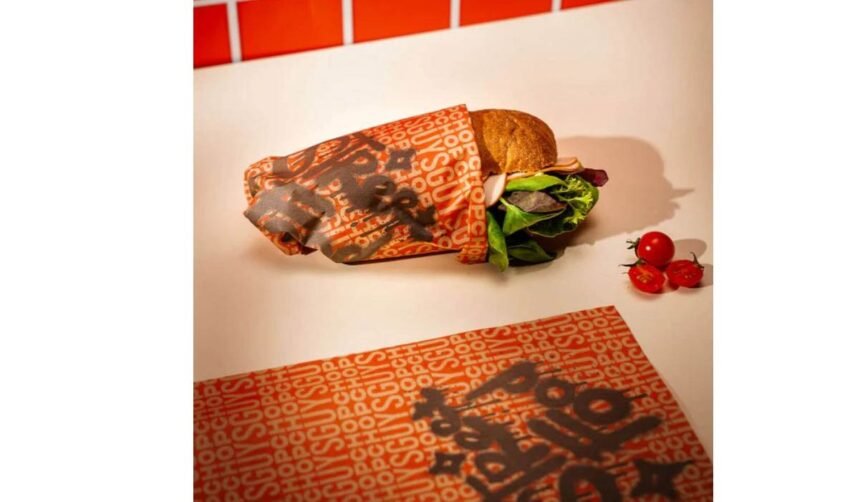
Custom printed greaseproof paper production combines a print process, an ink system, a base material, and a proof workflow into a single deliverable. UK food brands brief the artwork, and Packonic handles the technical translation from screen design to printed sheet. The translation step is where most of the production discipline sits. A well-briefed design can still go wrong at the press if ink choice, colour calibration, or proof approval are skipped.
Packonic produces custom printed greaseproof paper for cafés, restaurants, bakeries, takeaways, and food trucks across the United Kingdom. The print runs use food-safe certified inks tested for direct contact with food, applied to FSC certified greaseproof base stock. The online design tool, the dieline download, and the design team proof review combine to keep production consistent across orders. This article walks through the print process layer by layer, with reference to actual UK food service settings.
What Goes Into Custom Printed Greaseproof Paper Production
Custom printed greaseproof paper production sits on four technical layers. Each layer makes a distinct contribution to the finished sheet. A weakness in any one layer shows up in the print quality reaching the customer.
The four production layers:
- Base material: greaseproof paper treated to resist oil, in white or brown kraft
- Ink system: food-safe certified inks selected for direct food contact applications
- Print method: covers one-colour, multi-colour, and full coverage approaches
- Proof workflow: design team review before any production volume runs
Each layer is documented in a brief that the operator approves before press time. The brief becomes the reference for any future reorder. Operators who skip documentation tend to drift across batches; operators who lock the brief tend to reproduce the same result.
How Does the Packonic Design Tool Handle Custom Printed Greaseproof Paper
The Packonic design tool sits at the front of the production workflow. Operators use it in two ways: to design online from a template, or to upload existing artwork and align it against the dieline. Both paths feed into the same proof generation step that runs before press time.
For a Custom Printed Greaseproof Paper order placed through the design tool, the workflow checks artwork resolution, dieline alignment, colour mode, and bleed margins automatically. Files that miss any of these get flagged before they reach the design team. The design team then handles colour profile review, ink coverage planning, and final proof issue. Operators approve the proof through the same dashboard they used to upload the artwork, keeping every step in one place.
Ink and Colour Management Choices
Ink and colour decisions sit at the technical core of the print process. Two operators with the same logo can end up with noticeably different results if their ink and colour choices diverge. The table below compares the main options Packonic supports.
| Choice Layer | Options | What It Affects |
|---|---|---|
| Ink system | Food-safe certified inks | Direct food contact safety, oil migration resistance |
| Colour mode | CMYK, Pantone reference, brand RGB | Final colour accuracy on greaseproof base |
| Coverage | Spot, repeat pattern, full coverage | Visual weight and unit cost level |
| Colour count | One-colour, two-colour, multi-colour | Press setup time and price tier |
| Substrate | White greaseproof, brown kraft | Base contrast and mood reading |
Why Does the Proof Approval Step Matter
The proof approval step is the last decision point before a custom printed greaseproof paper order reaches the press. Once approved, the artwork is locked, the colours are calibrated, and the production volume runs to that specification. Skipping or rushing the proof step is one of the most common ways custom prints go wrong on UK food service orders.
Risks of skipping or rushing the proof:
- Colour values printing slightly off the brand reference, visible across thousands of sheets
- Sheet dimensions not matching the operator’s existing wrap or basket equipment
- Logo alignment shifting at the edges where the dieline was not double-checked
- Ink coverage running heavier or lighter than the operator expected at sheet level
- Base material reading darker or lighter under the operator’s actual service lighting
Each risk gets caught when proof approval runs as designed. Each risk gets compounded when proof approval gets skipped or compressed.
Print Coverage Options Explained
Print coverage describes how much of the sheet surface carries ink. Three options dominate UK food service custom orders: spot, repeat pattern, and full coverage. Each option has a use case, a cost implication, and a visual reading the operator should match to brand goals.
Print coverage options:
- Spot print: a single logo or mark placed once or twice per sheet, lowest cost tier
- Repeat pattern: brand mark or motif repeated on a regular grid across the sheet
- Full coverage: edge-to-edge artwork, often multi-colour, highest cost tier
- Mixed coverage: spot logo plus a light pattern, balancing cost and visual weight
Operators picking spot coverage often pay less per sheet but rely on the food itself for visual interest. Operators picking full coverage pay more per sheet but get a stronger brand impression at every wrap.
Production Timeline and Quality Control
The production timeline for custom printed greaseproof paper splits into three windows depending on order size. Standard orders run 14-21 days, express orders run 5-10 days, and wholesale orders run 28-35 days. Quality control steps stay the same across all three windows; only the production volume and dispatch logistics scale.
Quality control steps Packonic runs across every order:
- Artwork pre-check at file upload, flagging resolution and dieline issues
- Colour profile review by the design team before press setup
- Proof approval cycle with the operator before any production volume runs
- Press calibration on the actual greaseproof base material being used
- Visual inspection across the production batch before dispatch
Quality control runs the same on a 250-piece order and a 20,000-piece order. The difference is volume, not standard.
Frequently Asked Questions
What file formats does Packonic accept for custom printed artwork?
Vector files in PDF, AI, or EPS format are preferred because they scale cleanly across sheet sizes without quality loss. High-resolution raster files in PNG or TIFF are also workable when vector versions are not available. The Packonic design team reviews every uploaded file at the briefing stage and flags any quality issues before the proof generation step begins.
Can I print Pantone-specific brand colours on greaseproof paper?
Yes, Pantone references are accepted and used during the colour profile review stage. Greaseproof base material absorbs ink slightly differently from gloss paper. The proof stage is where any final adjustments to match the Pantone target get confirmed. Operators with strict brand colour requirements should provide Pantone codes during briefing rather than CMYK approximations alone.
How many colours can I use on a custom printed sheet?
Custom printed greaseproof paper supports one-colour, two-colour, and multi-colour print runs depending on the brief. One-colour and two-colour orders carry the lowest setup cost and ship faster on the standard production timeline. Multi-colour and full-colour artwork involves more press setup but unlocks richer brand expression. The Packonic design team confirms the colour count during the briefing stage.
Does the print quality differ between white and brown kraft greaseproof?
Print quality holds across both base materials, but the visual reading of the same colour shifts between them. White greaseproof gives higher contrast on dark inks, while brown kraft gives a softer reading and complements warm brand tones. The same artwork can be approved on both materials, but operators usually pick one base to keep brand consistency across orders.